Divisions Guide
The Overture divisions theme has more than 5.8 million point, line, and polygon representations of human settlements, such as countries, regions, states, cities, and even neighborhoods. Divisions represent recognized areas for governance, culture, or organization.
Divisions data can be used for many purposes, which can include, but are not limited to:
- reverse-geocoding
- cartographic styling and map rendering
- place labels
- choropleth rendering
- containment checks (e.g. point-in-polygon analysis)
- choosing a geometry based on your use case
 |
|---|
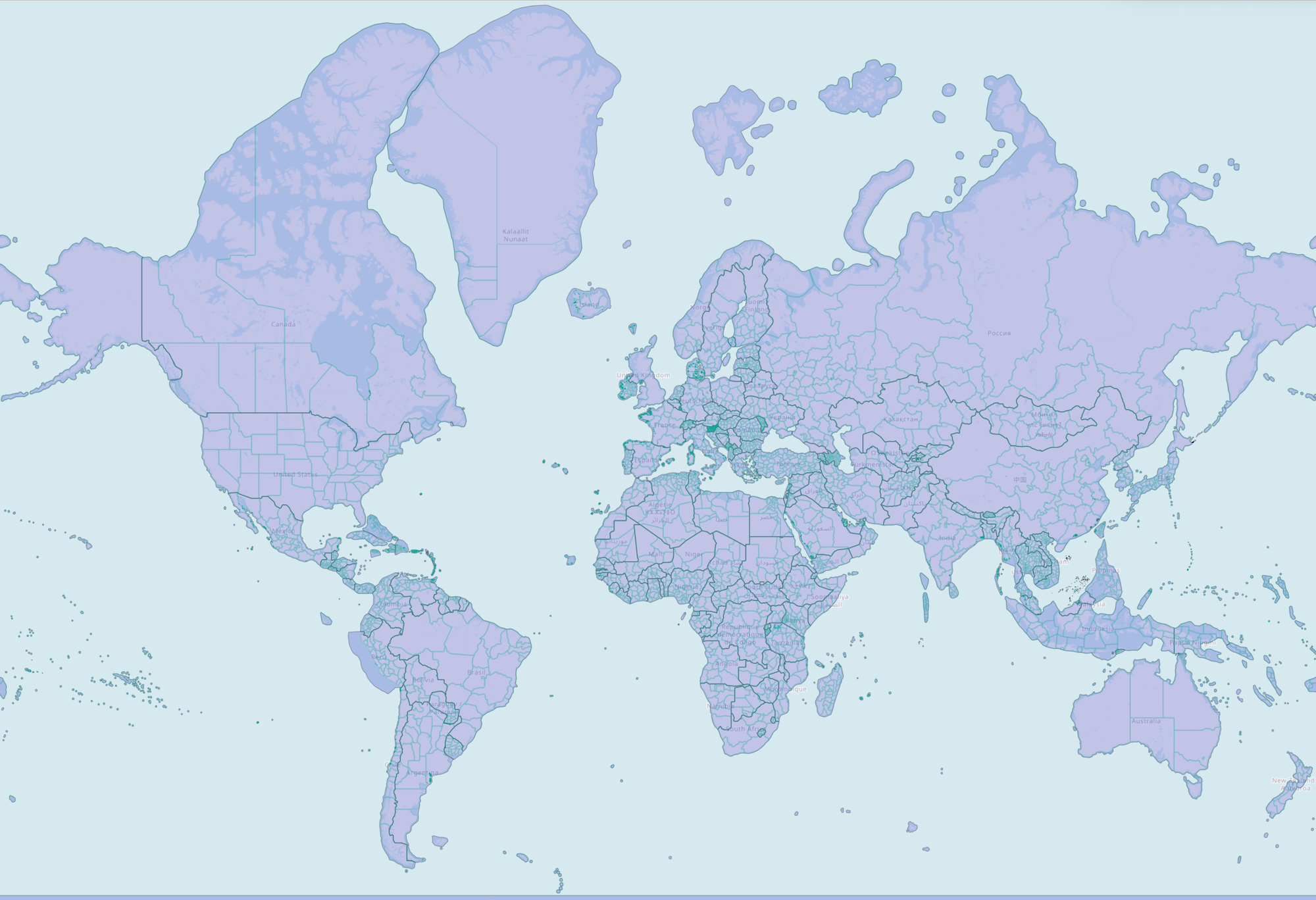
| Overture divisions data, styled by subtype: countries in purple, region boundaries as green lines. |
Dataset description
Feature type descriptions
A division is a feature type that represents an official or non-official organization of people: country, region, province, city, neighborhood, etc. — as seen from a given political perspective. It has a point geometry which gives an approximate location of the position most commonly associated with the feature.
A division_area is a feature type that captures the shape of the land area, or land and territorial sea (maritime), belonging to a division feature. It has a polygon or multipolygon geometry.
The is_land and is_territorial booleans represent a division area's extent. The only combinations that occur are:
- landlocked division areas:
is_land=TRUE,is_territorial=TRUE - division areas clipped to land only, water excluded:
is_land=TRUE,is_territorial=FALSE - unclipped division areas including water (the full territorial extent):
is_land=FALSE,is_territorial=TRUE
A division_boundary is a feature type that represents a shared border between two division features. It has a linestring geometry. The geometry of a divison_boundary is either wholly non-maritime, or wholly maritime. A maritime boundary is the extension of a non-maritime boundary into the water.
Subtype descriptions
Subtypes can represent each feature's administrative level, from country down to microhood. Subtypes can also represent a place hierarchy within a country and offer a standardized place definition for divisions. See below for a list of subtypes and their descriptions in the divisions theme:
List of all subtypes in the divisions theme
| subtype | description | example |
|---|---|---|
| country | Largest unit of independent sovereignty. | United States |
| dependency | A place that is not exactly a sub-region of a country but is dependent on a parent company for defence, passport control, subsidies, etc. | Puerto Rico |
| macroregion | A bundle of regions. These exist mainly in Europe. | Scotland; Île-de-France |
| region | States, provinces, regions. Largest sub-country administrative unit most countries, unless they have dependencies/macroregions. | Alaska; Alberta |
| macrocounty | A bundle of counties. Again, these exist mainly in Europe. | Inverness |
| county | Counties... Largest sub-region administrative unit in most countries, unless they have macrocounties. | Kings County, NY |
| localadmin | A level of government available in some parts of the world that contains localities or populated places that themselves have no authority. Often but not exclusively found in Europe. | Paris |
| locality | A populated place that may or may not have its own administrative authority. (It won't if it belongs to a localadmin.) | Taipei |
| borough | A local government unit, below the locality placetype. | Brooklyn, Queens, etc. |
| macrohood | A super-neighborhood that contains smaller divisions of type neighborhood. | BoCoCa (Boerum Hill, Cobble Hill, and Carroll Gardens) |
| neighborhood | A neighborhood. Most neighborhoods will be just this, unless there's enough granular division to warrant introducing macrohood and/or microhood divisions. | Cobble Hill |
| microhood | A mini-neighborhood that is contained within a division of type neighborhood. | Gätjensort in Hamburg |
Column definitions
The column definitions for the properties in each feature type in the divisions theme are generated from the schema and live in the schema reference:
Sources and licensing
The divisions theme is derived from a conflation of two community sources: OpenStreetMap, its primary source, and geoBoundaries. Because it includes OpenStreetMap data, the divisions theme is published under the ODbL license. See the licensing and attribution page for more information.
How we build the dataset
Filtering. Divisions are deduplicated, and topological overlap rules depend on subtype: overlap is allowed at lower subtypes (for example, locality) but not allowed for others (for example, country).
Matching. No cross-source matching step is documented for the divisions theme.
Merging. No cross-source attribute merging step is documented for the divisions theme.
Coverage and data quality
Coverage. The divisions theme provides global coverage. Coverage generally aligns with the admin_level tags in the OSM and geoBoundaries datasets:
- Global coverage of country, dependency, region, and county.
- Macroregion and macrocounty should be present, but are currently miscategorized as other subtypes.
- Subtypes below county (locality, borough, neighborhood, microhood) should be present in every country, but coverage is often spotty.
Known quality issues. There are minor macroregion categorization issues, and sub-county coverage is spotty as noted above.
Release artifacts and updates
The divisions theme is released on a monthly cadence. Alongside the data, the following release artifacts are provided:
- GERS registry: Division features are included in the GERS registry.
- GERS IDs: Assigned to division features.
- Bridge files: Provided.
- Data changelog: A changelog accompanies each release.
Data access and retrieval
Overture's divisions theme data is freely available on both Amazon S3 and Microsoft Azure Blob Storage at these locations:
- division
- division_area
- division_boundary
| provider | location |
|---|---|
| Amazon S3 | |
| Azure Blob Storage | |
| provider | location |
|---|---|
| Amazon S3 | |
| Azure Blob Storage | |
| provider | location |
|---|---|
| Amazon S3 | |
| Azure Blob Storage | |
The Getting Data section of this documentation offers instructions accessing the full Overture catalog. We recommend querying and downloading only the Overture data you need. If you have a particular geographic area of interest, there are several options for using a simple bounding box to extract divisions data.
- Overture Maps Explorer
- Python Client
- DuckDB
To quickly view and download modest amounts of data, you can use the Overture Maps Explorer website.
To download data: Pan to the area you are interested in, turn off the other layers, then click Download Visible.
This will download the area visible on your screen.
First, follow the setup guide for the Python Client.
This tool helps to download Overture data within a region of interest and converts it to a few different file formats. You can alter the bbox value to download a particular area. In this example, a bounding box is passed to obtain all divisions data around Boston, MA:
overturemaps download --bbox=-71.068,42.353,-71.058,42.363 -f geojson --type=division -o boston.geojson
First, follow the setup guide for DuckDB.
DuckDB allows you to pass a bounding box in your query to select features in a specified geogrpahic area. This example returns results for the country boundary between the US and Mexico:
LOAD spatial; -- noqa
LOAD httpfs;  -- noqa
-- Access the data on AWS in this example
SET s3_region='us-west-2';

SELECT
  *
FROM
  read_parquet('s3://overturemaps-us-west-2/release/2026-10-21.0/theme=divisions/type=division_boundary/*', filename=true, hive_partitioning=1)
WHERE
  bbox.xmin > -119.13728323
  AND bbox.xmax < -95.63020817
  AND bbox.ymin > 24.93478418
  AND bbox.ymax < 33.43995480
  AND subtype = 'country';
To download the full theme as parquet instead, use the following query (note: running it will result in a ~6.4GB file):
COPY (
    SELECT *
    FROM
        read_parquet('s3://overturemaps-us-west-2/release/2026-10-21.0/theme=divisions/*/*', union_by_name = True)
) TO 'all_divisions.parquet';
Querying and analysis
Using these queries, you can get counts for each feature type in divisions.
- total counts
- division counts
- division_area counts
- division_boundary counts
- area counts by subtype
- subtype counts (US/MX/CA)
LOAD spatial; -- noqa
LOAD httpfs;  -- noqa
-- Access the data on AWS in this example
SET s3_region='us-west-2';

SELECT
  count(*)
FROM
  read_parquet('s3://overturemaps-us-west-2/release/2026-10-21.0/theme=divisions/type=*/*', filename=true, hive_partitioning=1);
LOAD spatial; -- noqa
LOAD httpfs;  -- noqa
-- Access the data on AWS in this example
SET s3_region='us-west-2';

SELECT
  count(*)
FROM
  read_parquet('s3://overturemaps-us-west-2/release/2026-10-21.0/theme=divisions/type=division/*', filename=true, hive_partitioning=1);
LOAD spatial; -- noqa
LOAD httpfs;  -- noqa
-- Access the data on AWS in this example
SET s3_region='us-west-2';

SELECT
  count(*)
FROM
  read_parquet('s3://overturemaps-us-west-2/release/2026-10-21.0/theme=divisions/type=division_area/*', filename=true, hive_partitioning=1);
LOAD spatial; -- noqa
LOAD httpfs;  -- noqa
-- Access the data on AWS in this example
SET s3_region='us-west-2';

SELECT
  count(*)
FROM
  read_parquet('s3://overturemaps-us-west-2/release/2026-10-21.0/theme=divisions/type=division_boundary/*', filename=true, hive_partitioning=1);
LOAD spatial; -- noqa
LOAD httpfs;  -- noqa
-- Access the data on AWS in this example
SET s3_region='us-west-2';

SELECT
  count(*),
  subtype
FROM
  read_parquet('s3://overturemaps-us-west-2/release/2026-10-21.0/theme=divisions/type=division_area/*', filename=true, hive_partitioning=1)
GROUP BY
  subtype;
LOAD spatial; -- noqa
LOAD httpfs;  -- noqa
-- Access the data on AWS in this example
SET s3_region='us-west-2';

SELECT
  count(*),
  subtype
FROM
  read_parquet('s3://overturemaps-us-west-2/release/2026-10-21.0/theme=divisions/type=division_area/*', filename=true, hive_partitioning=1)
WHERE
  country IN ('US','MX','CA')
GROUP BY
  subtype;
You can also look up individual features by ID:
- query using an Overture ID
- query using an OSM ID
LOAD spatial; -- noqa
LOAD httpfs;  -- noqa

-- Access the data on AWS in this example
SET s3_region='us-west-2';

SELECT
  *
FROM
  read_parquet('s3://overturemaps-us-west-2/release/2026-10-21.0/theme=divisions/type=division_boundary/*', filename=true, hive_partitioning=1)
WHERE
  id = '085db5bb7fffffff0173c9b945a8c25f';
LOAD spatial; -- noqa
LOAD httpfs;  -- noqa
-- Access the data on AWS in this example
SET s3_region='us-west-2';

SELECT
  *
FROM
  read_parquet('s3://overturemaps-us-west-2/release/2026-10-21.0/theme=divisions/type=division_area/*', filename=true, hive_partitioning=1)
WHERE
  sources[1].record_id like 'r3766655@%';
Exporting locality and neighborhood divisions to a local shapefile
This query will return a subset of fields and the geometry for each locality and neighborhood division entity in Denmark.
LOAD spatial; -- noqa
LOAD httpfs;  -- noqa
-- Access the data on AWS in this example
SET s3_region='us-west-2';

COPY (
  SELECT
    id,
    names.primary as name,
    subtype,
    geometry -- DuckDB v.1.1.0 will autoload this as a `geometry` type
  FROM
    read_parquet('s3://overturemaps-us-west-2/release/2026-10-21.0/theme=divisions/type=division/*', filename=true, hive_partitioning=1)
  WHERE
    country = 'DK'
    AND subtype IN ('locality','neighborhood')
)
TO
  'overture_denmark_locality_neighborhood.shp'
WITH (
  FORMAT GDAL,
  DRIVER 'ESRI Shapefile',
  SRS 'EPSG:4326'
);
Exporting places data within Philadelphia to a local Parquet file
This query will return Places theme data for any place within the locality of Philadelphia
LOAD spatial; -- noqa
LOAD httpfs;  -- noqa

-- Access the data on AWS in this example
SET s3_region='us-west-2';

COPY (
  -- Create a temp table with the locality of Philadelphia
  WITH philly AS (
    SELECT
      id AS philly_id,
      names.primary AS philly_name,
      geometry AS philly_geom -- DuckDB v.1.1.0 will autoload this as a `geometry` type
    FROM
      read_parquet('s3://overturemaps-us-west-2/release/2026-10-21.0/theme=divisions/type=division_area/*', filename=true, hive_partitioning=1)
    WHERE
      subtype = 'locality'
      AND country = 'US'
      AND region = 'US-PA'
      AND names.primary = 'Philadelphia'
  ),

  -- Use the geometry of Philadelphia to filter out places within the locality boundary
  places AS (
    SELECT
      names.primary AS name,
      taxonomy.primary AS category,
      ROUND(confidence,2) AS confidence,
      geometry -- DuckDB v.1.1.0 will autoload this as a `geometry` type
    FROM
      read_parquet('s3://overturemaps-us-west-2/release/2026-10-21.0/theme=places/type=*/*', filename=true, hive_partitioning=1)
    INNER JOIN
      philly
    ON ST_WITHIN(geometry, philly.philly_geom)
  )

  -- Export the places selection to a Parquet file
  SELECT
    *
  FROM
    places
)
TO
  'philly_places.parquet';
Exporting different representations of a division area geometry
Using the is_land and is_territorial field values, you can export different extents of the same division area:
- exporting a land-clipped division area
- exporting a division's full territorial extent
This query will return regions in Japan with land-clipped geometries.
LOAD spatial; -- noqa
LOAD httpfs;  -- noqa
-- Access the data on AWS in this example
SET s3_region='us-west-2';

COPY (
  SELECT
    id,
    names.primary as name,
    subtype,
    geometry
  FROM
    read_parquet('s3://overturemaps-us-west-2/release/2026-10-21.0/theme=divisions/type=division_area/*', filename=true, hive_partitioning=1)
  WHERE
    country = 'JP'
    AND subtype = 'region'
    AND is_land = True
)
TO
  'overture_japan_is_land_region.gpkg'
WITH (
  FORMAT GDAL,
  DRIVER 'GPKG'
);
This query will return regions in Japan with geometries that represent full territorial extent, extending into water.
LOAD spatial; -- noqa
LOAD httpfs;  -- noqa
-- Access the data on AWS in this example
SET s3_region='us-west-2';

COPY (
  SELECT
    id,
    names.primary as name,
    subtype,
    geometry
  FROM
    read_parquet('s3://overturemaps-us-west-2/release/2026-10-21.0/theme=divisions/type=division_area/*', filename=true, hive_partitioning=1)
  WHERE
    country = 'JP'
    AND subtype = 'region'
    AND is_territorial = True
)
TO
  'overture_japan_is_territorial_region.gpkg'
WITH (
  FORMAT GDAL,
  DRIVER 'GPKG'
);